Posts: 1,294
Threads: 45
Joined: 05/2017
2018-03-22, 19:18
(This post was last modified: 2018-03-22, 19:20 by mwaters.)
(2018-03-22, 16:06)Alanpenwith Wrote: Hi All
Blue system windows 7
I have been trying to set up a shared network having changed from a wired to wireless network for the pc's. Obviously the controller has to stay on wired. Win 7 sets the lan adapter to an ip of 198.162.100.1 for a shared network so before doing this while I could still access the controller I set the dchp to enable and changed the ip to 198.162.100.10
Now if I ip scan the 100's I can no longer find the controller. Is there a way of doing a reset and what would the default ip then be. I have tried a power off and on but still no luck.
I am still getting a flashing network led although when I have made contact the data seems to be flowing OK (noise floor shows a continuous trace)
I'm rather stuck so HELP !!! Please !
Regards
Alan
Hi Alan,
We'd like to help, but I'm confused here.
What does Windows have to do with this? What router do you have, does it run Windows?
Posts: 39
Threads: 14
Joined: 09/2017
Hi
Sorry if it's confusing. The set up is a main pc and two netbooks (which each run only one programme which uploads to a website) Everything running windows 7.. Previously they were all wired (with a tooway satellite connection to the internet) but a new wifi system over the phone network has proved much faster so I changed the networks over to all wifi. (That in itself was not simple as windows and avg like making their own adjustments).
The problem, now, was connecting the blue system LAN into the wifi network to give it internet access - the wifi ips are in the range 198.162.0.N). That's why I tried a shared network and why windows was mentioned. The blue system is now connected directly to the LAN card of the main PC. As I understand it the blue system will first try to obtain an IP from dhcp, if that is not available it defaults to the static entry as a second try. As win 7 allocated an address of 198.162.100.1 to the lan card when sharing i put in 198.162.100.10 in the static box. Now I cannot see the blue system and neither can an ip scanner over the various ranges.
As above I have tried to go right back to basics but have failed there too. I'm not sure if the usb connection on the blue system is full usb or just connected as a power supply.
Apologies for the length and I hope it helps.
Regards
Alan
Posts: 1,294
Threads: 45
Joined: 05/2017
2018-03-22, 20:20
(This post was last modified: 2018-03-22, 20:42 by mwaters.)
No need to apologize. It sounds like you're using a Windows PC as a router and firewall. I can't help you with that, perhaps someone else can. We have completely switched from M$ Winders to Linux Mint and Ubuntu here.
I have always used separate standalone Linux-based routers. The one I now use is an old PIII 450 MHz computer with 256 MB RAM and two LAN cards, running free
pfSense router/firewall software.
See my Google+ page
I Prefer Linux:
https://plus.google.com/u/0/collection/43TlIE
Posts: 659
Threads: 5
Joined: 11/2017
Quote:That's why I tried a shared network and why windows was mentioned. The blue system is now connected directly to the LAN card of the main PC.
Let's see if I have it correct.
The PC is connected to the Internet via WiFi. Then you have the BO connected to the same PC via the LAN port?
This will not work unless you do some network changes as Win7 only communicates on one interface. Default is Wifi then LAN.
Posts: 142
Threads: 12
Joined: 05/2016
2018-03-22, 20:50
(This post was last modified: 2018-03-22, 20:59 by Jorgeminator.)
(2018-03-22, 20:27)dupreezd Wrote: Quote:That's why I tried a shared network and why windows was mentioned. The blue system is now connected directly to the LAN card of the main PC.
Let's see if I have it correct.
The PC is connected to the Internet via WiFi. Then you have the BO connected to the same PC via the LAN port?
This will not work unless you do some network changes as Win7 only communicates on one interface. Default is Wifi then LAN.
Well, the thing is, it does work. He's sharing the WiFi connection with the Ethernet port, like this:
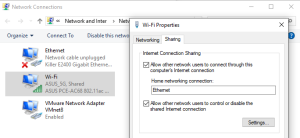
There's just too much confusion in this thread at the moment. The IP's written here are all over the place, for example
198.
162.*.*, that range is never assigned locally and belongs to an ISP somewhere. Please check, double-check, and check once more before you write the IP's here. It's impossible for us to troubleshoot if we don't know what IP you actually used.
If you really do have DHCP enabled in the controller's settings you should grab Angry IP Scanner or something similar and scan the range 192.168.100.2-192.168.100.255. For me, Windows 10 assigns the shared network an IP in the 192.168.137.2-192.168.137.255 range, but I guess then that Windows 7 uses the 192.168.100.* range.